
Four steps. No tech expertise needed. By the end of this guide, you'll know how to take barber bookings online, and have a live booking page for your barbershop ready to go.
The short version
Setting up online booking for your barbershop follows four guided steps. With Setora, you enter shop details, set hours, list services and prepare the Booking Page. Timing varies with the amount of data and checking involved. This guide covers both setup and the practical side of sharing the link.
If you're still deciding which booking platform is right for your shop, our barbershop booking software guide covers the options in detail. If you're ready to get set up now, carry on.
Why online booking is worth setting up
If you're running a barbershop and taking all your bookings by phone, you're probably losing bookings you don't know about.
A client wants to rebook at 9pm on a Tuesday. You're not picking up. They try once, maybe twice, then give up and book somewhere else, or just tell themselves they'll do it tomorrow and never do. That booking didn't exist in your eyes, but it should have.
A significant portion of online barbershop bookings happen outside of business hours, evenings and weekends when you're unavailable to answer a call. Online booking captures that demand automatically. Your booking page takes appointments 24 hours a day, seven days a week, without you lifting a finger.
There are a few other reasons the switch makes sense:
No-shows drop. Booking software sends automated reminders before appointments. Clients are less likely to forget, and they can cancel easily via a link rather than ghosting you. If no-shows are already an issue, our no-show cost guide walks through what they're probably costing you and how to cut the rate.
You stop acting as a receptionist. Taking bookings by phone takes time. It interrupts cuts, pulls you out of conversations, and puts you in an uncomfortable position if a client rings mid-fade. Online booking removes the interruption entirely.
Younger clients expect it. A growing proportion of clients, particularly those under 35, actively prefer to book online. Not because it's more convenient, but because they find calling awkward. Give them an online option, and they'll use you over a shop that only takes calls.
None of this requires you to abandon phone bookings or walk-ins. Online booking sits alongside what you already do. It just fills the gaps.
What you need before you start
Before you open the setup screen, gather the information below. Having it ready reduces interruptions, but the total setup time varies by shop.
- Your services: Write out everything you offer with a name, price, and approximate duration. For example: Skin Fade, £20, 30 mins. Don't overthink the list, you can edit and add services any time after going live.
- Your opening hours: Which days you're open and at what times. Include any half-days or irregular hours.
- Your business address: The full address that clients should see on your booking page.
- A contact email: This is where booking confirmations and notifications go. Use one you actually check.
- A logo or profile photo (optional): Adds a professional touch to the booking page. Not required to go live, but worth adding when you have a moment.
That's it. Everything else, deposits, team members, custom services, booking rules, you can configure once you're set up. The goal right now is to get live.
How to set up online booking for your barbershop: the 4 steps
We're using Setora as the worked example here. The steps are the same whether you're setting up from scratch or switching from another platform. If you're migrating from Fresha, Booksy, or Square, there's a CSV import option at Step 3 so you don't have to start your client list from zero.
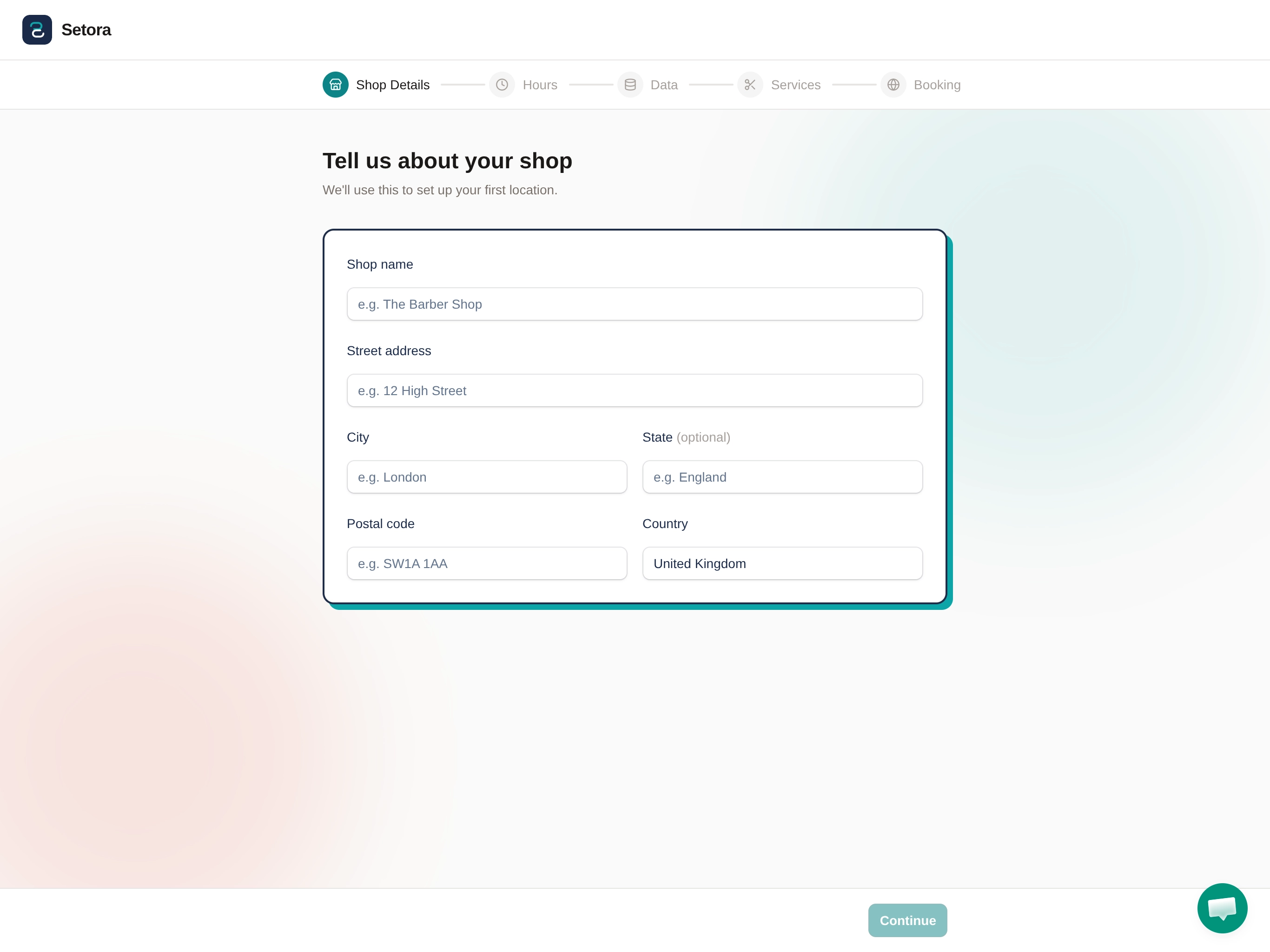
Step 1: Shop details
Enter your business name, address, and contact information.
This is what clients see when they land on your booking page, the shop name, where you're based, and how to reach you. Keep the address accurate, since clients sometimes use it to confirm they're booking the right location, especially if you have a common shop name.
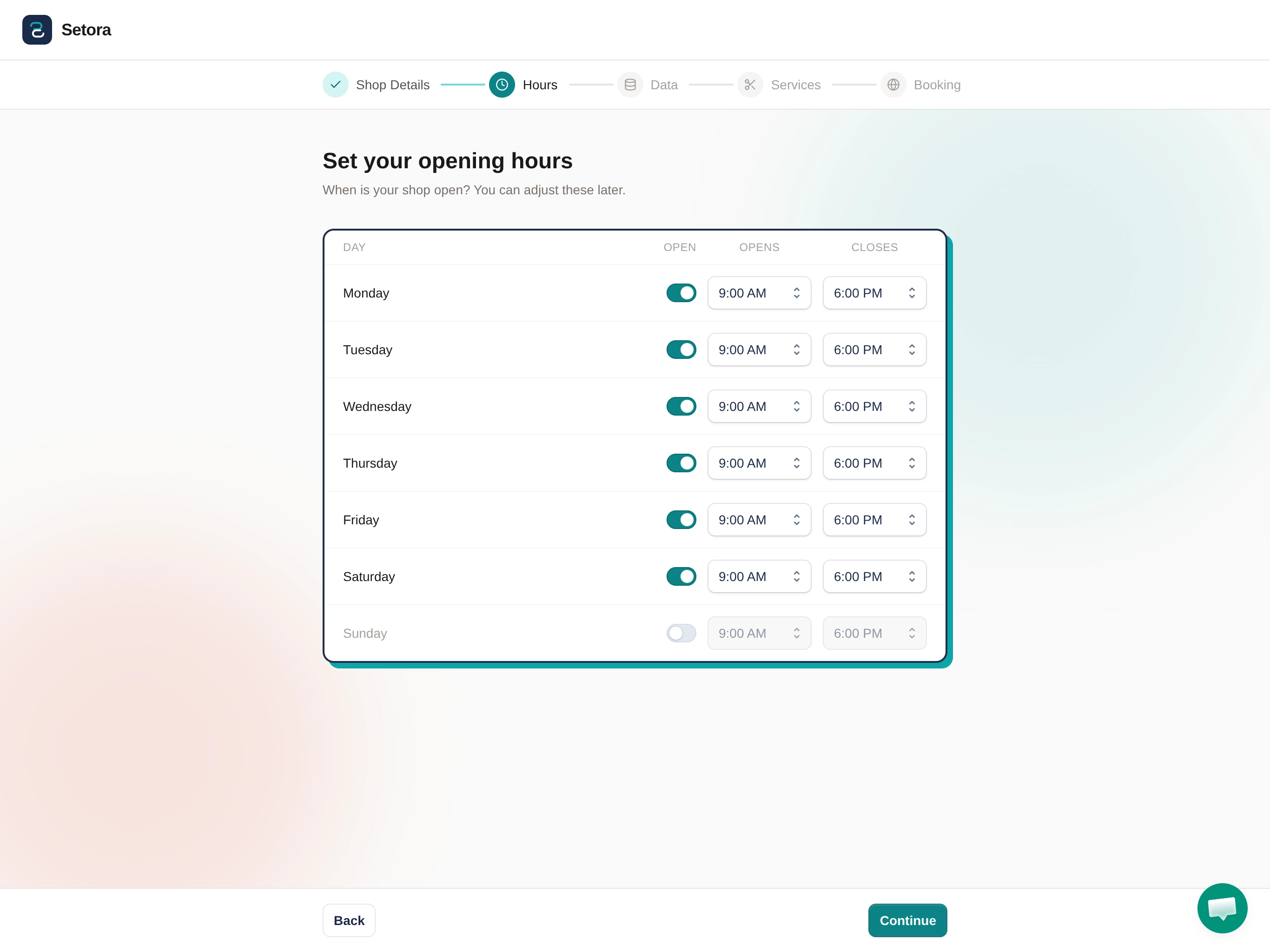
Step 2: Opening hours
Set your hours for each day of the week.
Pre-populated suggestions are available to speed this up. If you run standard barbershop hours, Monday to Saturday, 9am to 6pm, say, you can accept the defaults and adjust where needed. Different hours on different days, or a half-day on Saturday? Edit each day individually.
You can update your hours any time from your dashboard, so don't stress about getting every detail perfect on day one. Blocking a day for a holiday is as simple as toggling it off.
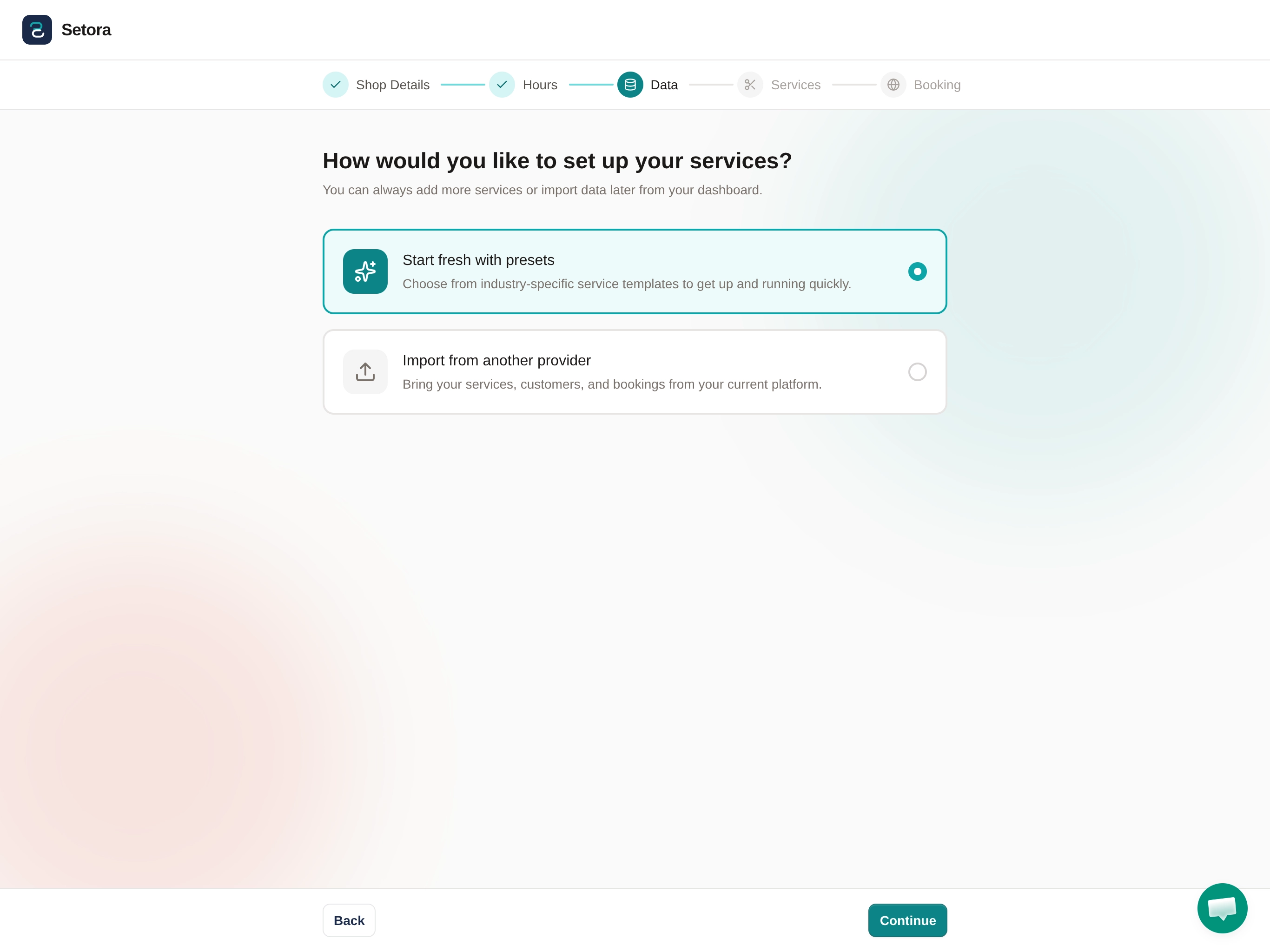
Step 3: Services
Choose how to set up your services.
Setora asks whether you want to start fresh with industry presets or import data from your current platform. Choose presets and you'll be presented with barbershop service templates, skin fades, beard trims, hot towel shaves, line-ups, and more, which you can use as-is or adjust to match your pricing and durations. If you run a solo chair, the whole thing takes under a minute.
If you're switching from another platform, choose "Import from another provider" instead. This brings across your services, customers, and existing bookings from Fresha, Booksy, Square, and other platforms, no re-entering everything from scratch.
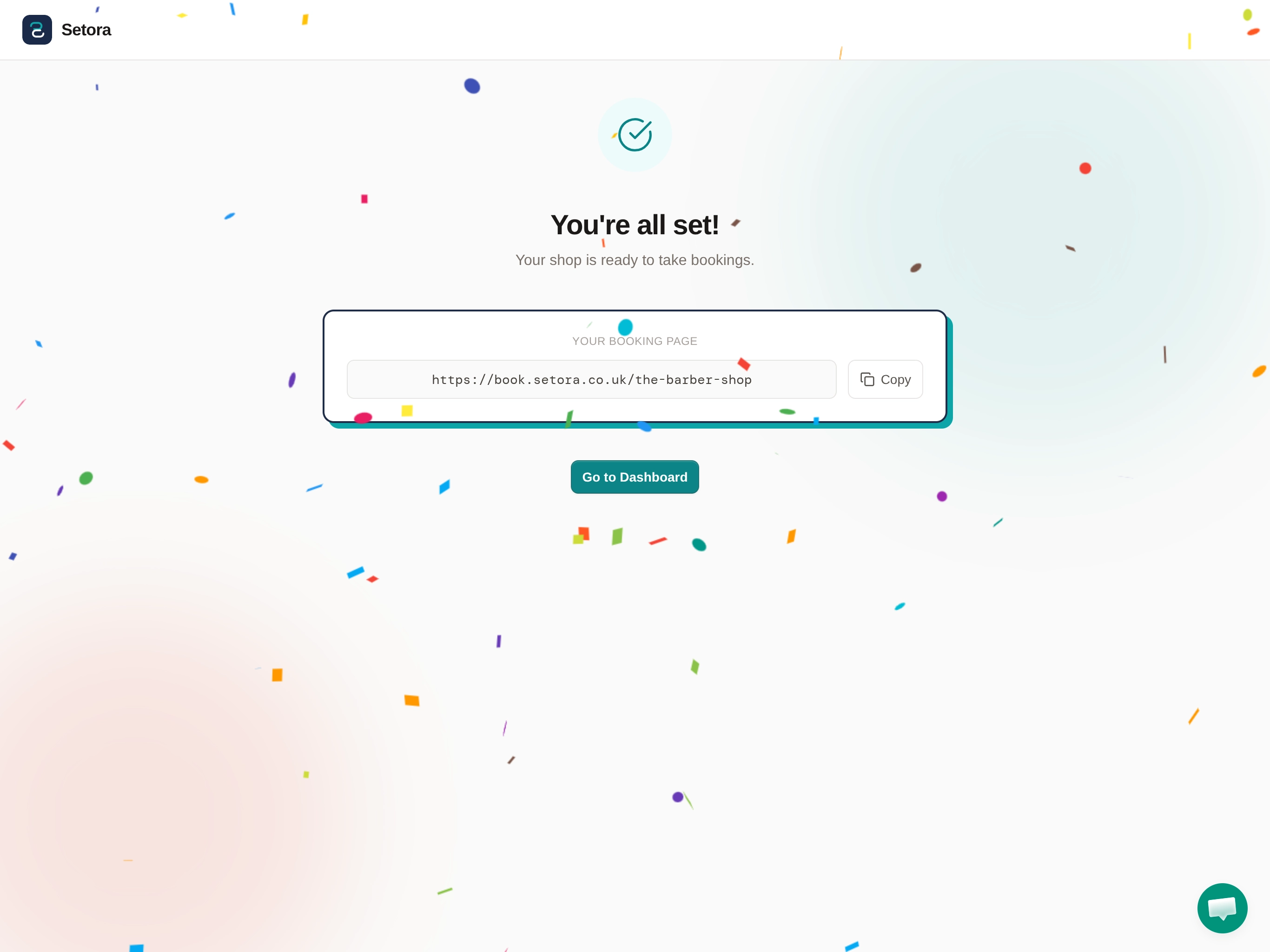
Step 4: Your booking link
Once you complete the setup steps, your booking page is live.
You'll receive a URL, something like book.setora.co.uk/your-shop-name, that clients can use to book directly. No additional configuration needed. The page is ready to take appointments immediately. Setora also supports custom domains if you'd prefer clients to book through your own URL, reach out to the team to set that up.
This is the link you'll put in your Instagram bio, your Google Business profile, and anywhere else clients find you. More on that in the next section.
Those are the four guided steps. Check the services, hours, staff availability and customer view before sharing the link.
For a closer look at how the Setora onboarding experience is designed, the full walkthrough is documented there.
After setup: getting clients to use the link
The setup is the easy part. Getting clients to actually use the booking link is where most of the work is, and where most barbers underestimate what's required.
Don't assume clients will find the link on their own. They won't. You need to actively put it in front of them, across every channel they already use to find you or contact you. Here's how.
WhatsApp message to regulars
The most direct approach. Message your regulars individually, or use WhatsApp Broadcast to send a single message to a list. Something like this works well:
Hi [Name], just letting you know you can now book your next cut online, no more calling. It takes about 30 seconds: [link]. See you soon.
Keep it short. Don't oversell it. Most clients just want to know the option exists.
Instagram bio
If you're currently using "DM to book" or a phone number in your bio, replace it with the booking link. You'll still get the occasional DM asking about availability, but clients who book through the link are more committed, they've gone through the booking flow rather than firing off a message and waiting.
If you use a link-in-bio tool like Linktree, add the booking link as the top option.
Google Business Profile
This one is underused by most barbershops. Your Google Business Profile has a "Book Online" button that appears directly on your Google listing, anyone who finds you through Maps or a local search can book without ever visiting your website or Instagram.
To set it up: log into your Google Business Profile, go to Info, and add your booking URL under "Appointment links". It usually takes a few hours to appear publicly.
At the chair
At the end of each cut, mention it once: "You can rebook through the link in our Instagram bio, saves you calling." This works particularly well with regulars who book every three to four weeks. You're offering them a better option than the one they currently use, and they appreciate the directness.
One announcement post
Put up a single Instagram story or post: "You can now book your next cut without calling. Link in bio." You don't need to make it a big deal. One post is enough to reach most of your existing followers. You can always post it again a month later for anyone who missed it.
What to expect in the first month: The shift to online booking is gradual. You'll see a trickle in the first week, more in the second, and by the end of the month, a noticeable portion of new bookings will arrive through the link rather than by phone. The clients who were always going to call will still call. The clients who were on the fence often switch to online after trying it once. And a small number of new clients will find you entirely because they can book without calling, they wouldn't have booked at all otherwise.
Handling walk-ins alongside online booking
Setting up online booking doesn't mean you have to stop taking walk-ins. Most barbershops run both at the same time without issue, you just need a simple approach for managing the diary.
The most common setup: hold certain time slots back from online booking and use them for walk-ins. Some shops leave the first hour of the morning and the last hour of the day open for walk-ins, with the rest of the day available to book online. Others keep a dedicated chair for walk-ins if they run a multi-barber setup.
There's no universal formula. The right balance depends on your location, your client mix, and how many walk-ins you currently get. Most barbers work it out within two or three weeks of going live with online booking, you'll start to see patterns in when walk-ins come in and adjust accordingly.
The important thing is not to treat it as either/or. Online booking works best as an addition to what you already do, not a replacement for it.
Common objections, answered
"My clients prefer to call"
Some do. That's genuinely true, and it's worth taking seriously rather than dismissing.
But it helps to separate the people who actually prefer to call from the people who call out of habit. The first group, usually long-standing regulars with a personal relationship with you or a particular barber, will probably keep calling regardless of what booking options you offer. That's fine. Keep answering.
The second group, clients who call because they've always called and don't know there's another option, will often switch to online booking the moment they see the link. One text from you, one Instagram story, and the next time they need a cut they try the link, it takes 30 seconds, and they never call again. That's the most common pattern.
Then there's a third group you never see: the clients who wanted to book but didn't, because calling felt like too much effort, too formal, too awkward if you're fully booked, too dependent on you answering at the right time. Online booking captures those people silently. You'll notice it as a general increase in bookings rather than specific phone calls replaced.
"I don't need the tech"
This is usually less about technology and more about control. The real concern tends to be: what if I don't understand it? What if something breaks? What if I lose the flexibility I currently have?
The honest answer is that modern booking platforms are built to be operated without any technical background whatsoever. The setup described in this guide is the entire thing, there's nothing more complex than entering a business name and setting your hours. You don't need to know how to code, how servers work, or anything else.
And the control doesn't go away. If you need to close for a day, you block it. If you want to hold certain hours back from online booking, you do. If you change your services or prices, you update them. The system works around your decisions, not the other way around.
The barbers who resist online booking the longest often become the most enthusiastic converts after going live, because the day-to-day reality is simpler than they expected.
What to set up next
Your booking page is live and clients are starting to use it. Here's what most barbers configure in the first week or two after going live.
Automated reminders
This is the single biggest thing you can add to reduce no-shows after going live. Booking software sends an email or text to clients 24 hours before their appointment, and another on the morning of, without you doing anything. Clients who genuinely forgot get a nudge. Clients who can't make it cancel early enough for you to fill the slot.
If reminders aren't configured by default, go into your settings and turn them on. The exact steps vary by platform. In Setora, reminders are on by default and go out automatically for every booking.
Deposits
Optional, but worth considering if no-shows are already an issue. Requiring a £5 or £10 deposit at the time of booking creates a small financial commitment that makes clients far less likely to simply not turn up. The deposit is deducted from the total at the chair, the client pays the same overall, just part of it upfront.
You don't need to apply deposits to every booking. Some shops require them only for first-time clients, or only for premium services that involve longer slots.
Team member accounts
If you run a multi-barber shop, add your team members and assign services to each. This lets clients book with a specific barber rather than just the shop in general, which is what most regulars prefer. It also gives each barber visibility of their own diary without access to anything else.
Your booking page link on your website
If you have a website, add a "Book Now" button that links to your booking page. Even if your site doesn't get much traffic, it's a missed opportunity not to have a booking link visible somewhere prominent. Most booking platforms generate an embeddable widget as well, so clients can book without leaving your site entirely.
What Setora costs
Online booking, automated reminders, client management, and everything else covered in this guide is included in Setora's £39/month per location. No commission on bookings. No per-booking fees. No marketplace that takes a cut of clients who've never heard of your shop.
Some platforms operate differently. If you're currently on Fresha, it's worth understanding what their commission structure actually costs a typical UK barbershop before assuming it's cheaper. If you're comparing flat-rate platforms, our Setora vs NearCut breakdown covers the pricing differences in detail.
Start a 14-day free trial. No card is required, and the account pauses automatically if you do not subscribe.
Setora setup steps are based on the current guided flow. No universal completion-time claim is made. Third-party pricing should be checked against the provider's current terms.
Common questions
- How long does it take to set up online booking for a barbershop?
- Setora uses four guided steps: add your shop details, configure opening hours, list your services and prepare the Booking Page. Timing varies with the shop and the data being entered.
- Can I still take walk-ins if I use online booking?
- Yes. Online booking doesn't replace walk-ins, it adds another route for clients to reach you. Most shops run both side-by-side: walk-ins during quieter periods, pre-booked slots filling the diary otherwise.
- Do clients need to download an app or create an account to book?
- No. Clients book with just their name, phone number, and email address. There's no app to download and no account to create on their end.
- What if a client still prefers to call?
- Keep taking calls. The goal isn't to force everyone online overnight, it's to capture the clients who want to book at 10pm without calling you. Most shops find the majority of new bookings shift online within the first month.
- How much does online booking cost for a barbershop?
- It depends on the platform. Setora charges £39/month per location with no per-booking fees or marketplace commissions. Some platforms charge up to 20% commission on new clients sourced through their marketplace.
- How do I take barber bookings online?
- Choose a booking platform, enter your shop details, set opening hours and add services. Test the Booking Page before sharing its link on Instagram, Google Business Profile or your website.
- Is online booking worth it for a small barbershop?
- Yes. Even a solo-chair shop benefits because online booking captures appointments outside business hours, evenings and weekends when you can't answer the phone. It also reduces no-shows through automated reminders and means you're not interrupted mid-cut to take bookings.
Share this guide